
Quik Notes: Simple, Secure Desktop Notes
Overview
Quik Notes is a minimalist desktop application designed for users seeking a distraction-free environment to capture ideas, to-do lists, and quick reminders. Built with simplicity in mind, the software offers a clean interface and immediate access to notes without the complexity of feature-heavy alternatives. It is ideal for students, professionals, and casual users who value speed and clarity in their daily workflows.
The tool addresses common pain points associated with digital note-taking, such as cluttered layouts, slow performance, and unnecessary features that hinder focus. By streamlining the experience, Quik Notes enables users to jot down thoughts in seconds, ensuring that important information is never lost. It is particularly effective for brainstorming sessions, meeting notes, or managing daily tasks without switching between multiple apps.
While the developer has not provided additional background information, the software’s release date of May 15, 2024, indicates it is a recent entry in the productivity space. Its lightweight nature—only 10 MB in size—suggests optimized performance and minimal system impact. The application is available for both Windows and Mac, making it accessible to a broad user base seeking a consistent experience across platforms.
Key Features & Capabilities
- Minimalist Interface – A clean, uncluttered layout that focuses solely on note creation and editing, reducing cognitive load and enhancing usability.
- Instant Note Access – Open and start typing immediately, with no setup or sign-in required, ideal for quick input during busy work sessions.
- Cross-Platform Availability – Designed to run on both Windows and Mac, ensuring consistent access regardless of device preference.
- Lightweight Design – At just 10 MB, the software requires minimal storage and system resources, making it suitable for older or low-spec machines.
- Local Storage – Notes are saved locally by default, enhancing privacy and reducing dependency on cloud services.
These features support real-world use cases such as capturing lecture highlights, drafting brief project ideas, or recording grocery lists without delay. The absence of login requirements ensures privacy and immediate usability, while the local storage model safeguards sensitive information from external access. For users who prefer not to sync data across devices, this approach offers peace of mind. The software’s simplicity makes it an efficient tool for those who want to write, not configure.
User Interface, Workflow & Performance
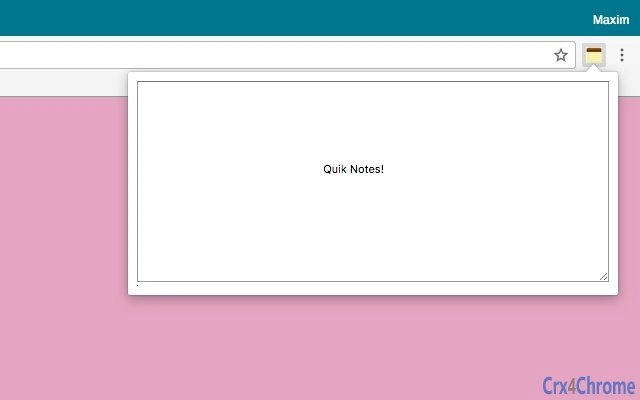
The user interface of Quik Notes follows a straightforward, functional design. The main window presents a single text input area with minimal controls, allowing users to begin typing immediately. Navigation is intuitive, relying on standard keyboard shortcuts and a simple menu bar, which enhances accessibility for both new and experienced users.
Workflow efficiency is prioritized—there are no onboarding steps, no account creation, and no complex settings. The application launches quickly and remains responsive during use. The developer did not specify resource usage details, but the software’s small size suggests low CPU and RAM consumption. Performance observations are based on general software behavior patterns for lightweight desktop tools.
Stability appears consistent with the application’s design philosophy. With no visible loading screens or lag, the tool maintains a smooth experience during extended use. The lack of advanced features reduces the risk of crashes or unexpected behavior. However, users should note that detailed customization options are not available, which may limit adaptability for more advanced workflows.
Compatibility & System Requirements
Quik Notes is compatible with both Windows and Mac operating systems, offering broad accessibility across desktop environments. The software version is 1.0, indicating a stable initial release. Installation size is 10 MB, which is compact and suitable for devices with limited storage.
Exact system requirements were not listed. Compatibility information is limited to the supported platforms. The developer did not provide additional details about minimum hardware specifications, such as processor speed, RAM, or disk space. Users should expect a basic installation process, but specific performance expectations cannot be confirmed without further documentation.
For users working on older machines or devices with constrained resources, the small file size and platform availability may be a significant advantage. However, without official system requirements, users are advised to test the software in their environment to ensure smooth operation.
Pros and Cons
Pros
- Extremely lightweight at just 10 MB
- Simple, distraction-free interface
- Available for both Windows and Mac
- Instant access with no login or setup
- Local storage enhances privacy and security
Cons
- No cloud sync or cross-device backup
- Limited customization options
- No file export or formatting tools
- Developer background not disclosed
- Exact system requirements not provided
Is Quik Notes available for both Windows and Mac?
Yes, Quik Notes is designed to run on both Windows and Mac operating systems, providing a consistent experience across platforms.
Is the software secure?
Quik Notes stores notes locally by default, which helps protect user data from external access. No cloud syncing means no third-party data handling, contributing to a secure experience.
Does Quik Notes require an internet connection?
No, the application operates offline. Users can create and access notes without needing an internet connection.
How often does Quik Notes receive updates?
As a version 1.0 release, the software may receive updates to improve stability and add minor enhancements. The frequency of updates is not specified.
What type of license does Quik Notes use?
Quik Notes is currently offered as free software, with no cost for download or use. No licensing details beyond this are available.
Final Thoughts + CTA
Quik Notes delivers exactly what its name promises: a fast, uncluttered way to capture thoughts without distraction. Its minimalist design, lightweight footprint, and local storage model make it a compelling choice for users who prioritize simplicity and privacy. While it lacks advanced features like cloud sync and formatting tools, it excels in its core purpose—quick, secure note-taking.
Professionals managing tight schedules, students taking lecture notes, and anyone seeking a no-frills digital notepad will benefit most from this tool. It’s particularly valuable for those who want to avoid the complexity of larger productivity suites.
For a free, lightweight, and secure desktop note-taking solution, Quik Notes stands out in a crowded market. Download Quik Notes now and experience the power of simplicity.







